
Skriptum (Web)
3D Viewer for IFC models
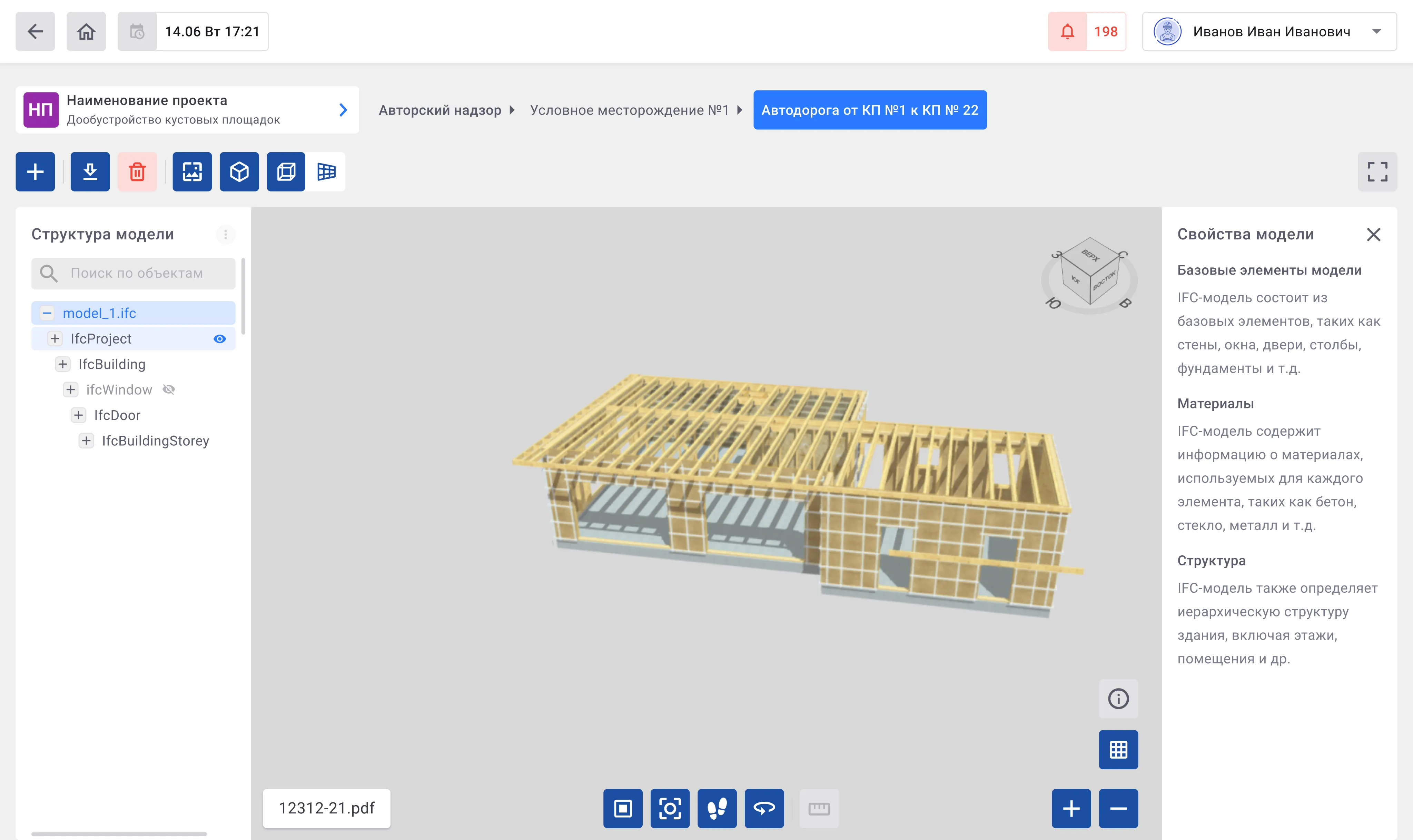
I designed a module for viewing and working with IFC 3D models straight in the browser. Users can explore the model structure, switch navigation and display modes, and inspect element properties without leaving the app.
 Goal
Goal The goal was to make BIM models accessible to all project participants, not just architects and engineers, but also managers and clients. The viewer had to make working with a model feel natural: rotate, zoom, hide elements, inspect details, without any special training.
 Result
 Users could study models directly in the app, find the elements they needed, and check details without external software. That cut down on coordination overhead and sped up project reviews.
 Personal challenge
 The viewer had to work for engineers who already live in BIM tools and for managers who had never opened one. Getting that balance right without making it feel dumbed down took several iterations.
Core functionality
- 1 Model viewing
Users can expand or collapse the model structure and hide or show individual elements directly from the structure panel.
- 2 Search
Search works inside the model structure, the same way as project-level search, so the pattern is already familiar.
- 3 Model viewing tools
Navigation and display controls sit at the top and center of the workspace. Controls in the bottom-right corner handle the base plane, element properties, model scale, and fullscreen mode.
- Top view

- First-person view

- Display modes

- Centering

- Background color

- Toggle base plane

- Model properties

- Fullscreen mode

- Projection selection


- Top view
- 4 Viewing model properties
A right-side panel shows properties for the selected element. No need to leave the workspace to look something up.
Monthly-Daily Schedule (MDS)
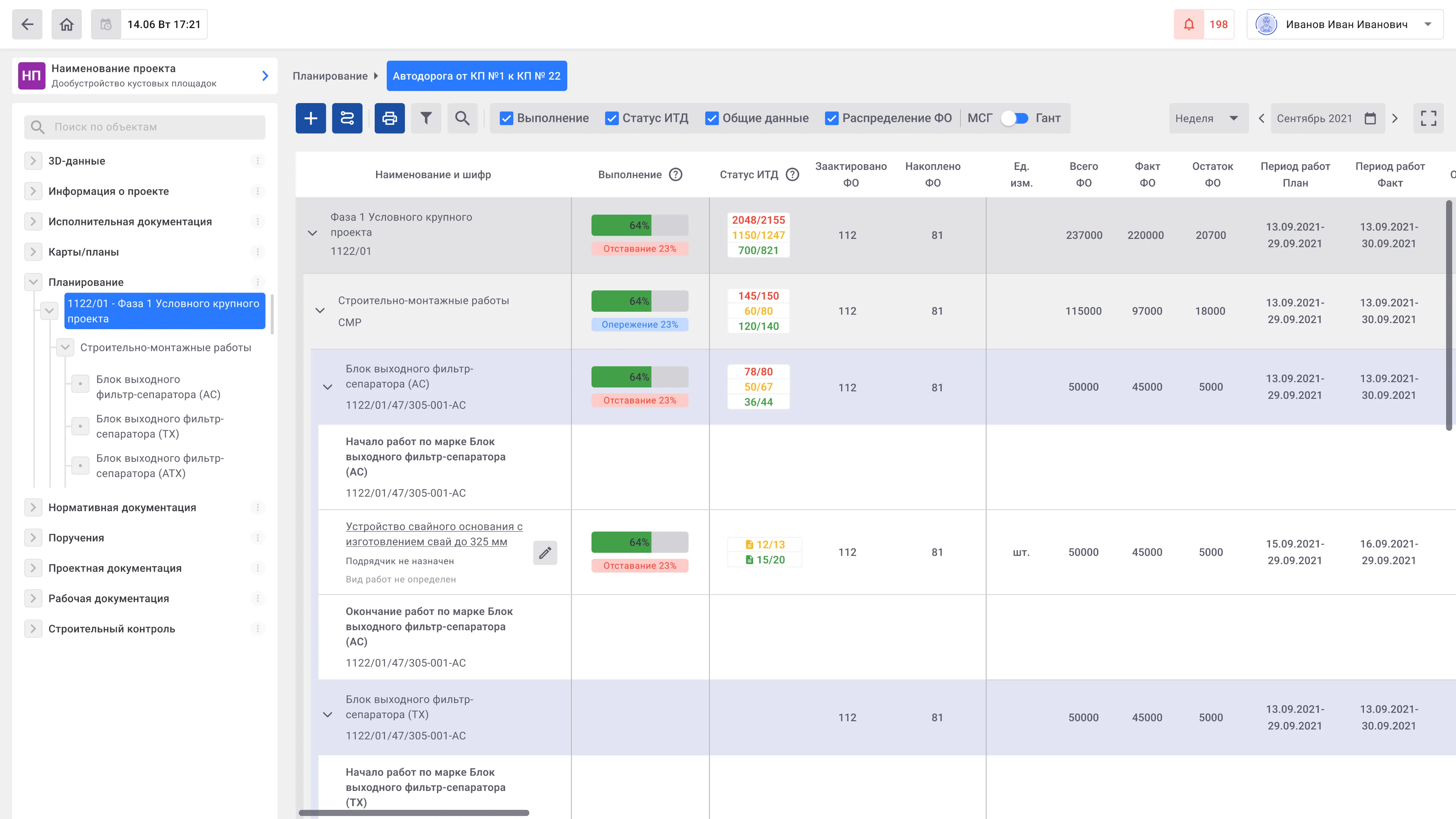
I designed an operational tool for planning and tracking construction and installation work, day by day. The schedule shows task dependencies and sequences, ties progress to time, resources, and costs, and surfaces the bottlenecks that actually matter.
Goal The aim was a planning interface that gives transparency and control over construction progress. Adjusting schedules and coordinating teams had to stay simple. Visual clarity mattered most: complex construction data had to stay readable for engineers and managers alike.
Result Teams got a single tool for planning and tracking instead of spreadsheets. Switching between the overall view and daily detail became fast, and status and risk visibility improved. Decisions that used to need a meeting could be made straight from the schedule.
Personal challenge Construction data is genuinely complex: a lot of tasks, dependencies, resources, and states. The challenge was keeping it readable without hiding anything important. Engineers needed the detail, managers needed the overview, and the same interface had to serve both.
Core functionality
- 1 Schedule creation and display
Plan construction work by months and days, track task sequences, and monitor progress in detail.
- 2 Creating and editing timelines
Quickly create and adjust task schedules, assign performers, and manage shifts to reflect real-time site conditions.
- 3 Visualization of statuses and risks
Use color coding and visual indicators to display progress, resource load, deviations, and potential risks, giving an at-a-glance view of the project.
- 4 Navigation and detail
Switch easily between overall schedule views and detailed daily or stage-specific information to maintain full control over workflow.
- 5 Process automation
Support for automatic copying of stages, calculations, and recurring operations reduces time spent on manual updates and minimizes errors.
- 6 Data export and sharing
Export schedules and reports in multiple formats for analysis, reporting, and team collaboration.