
Skriptum (Web)
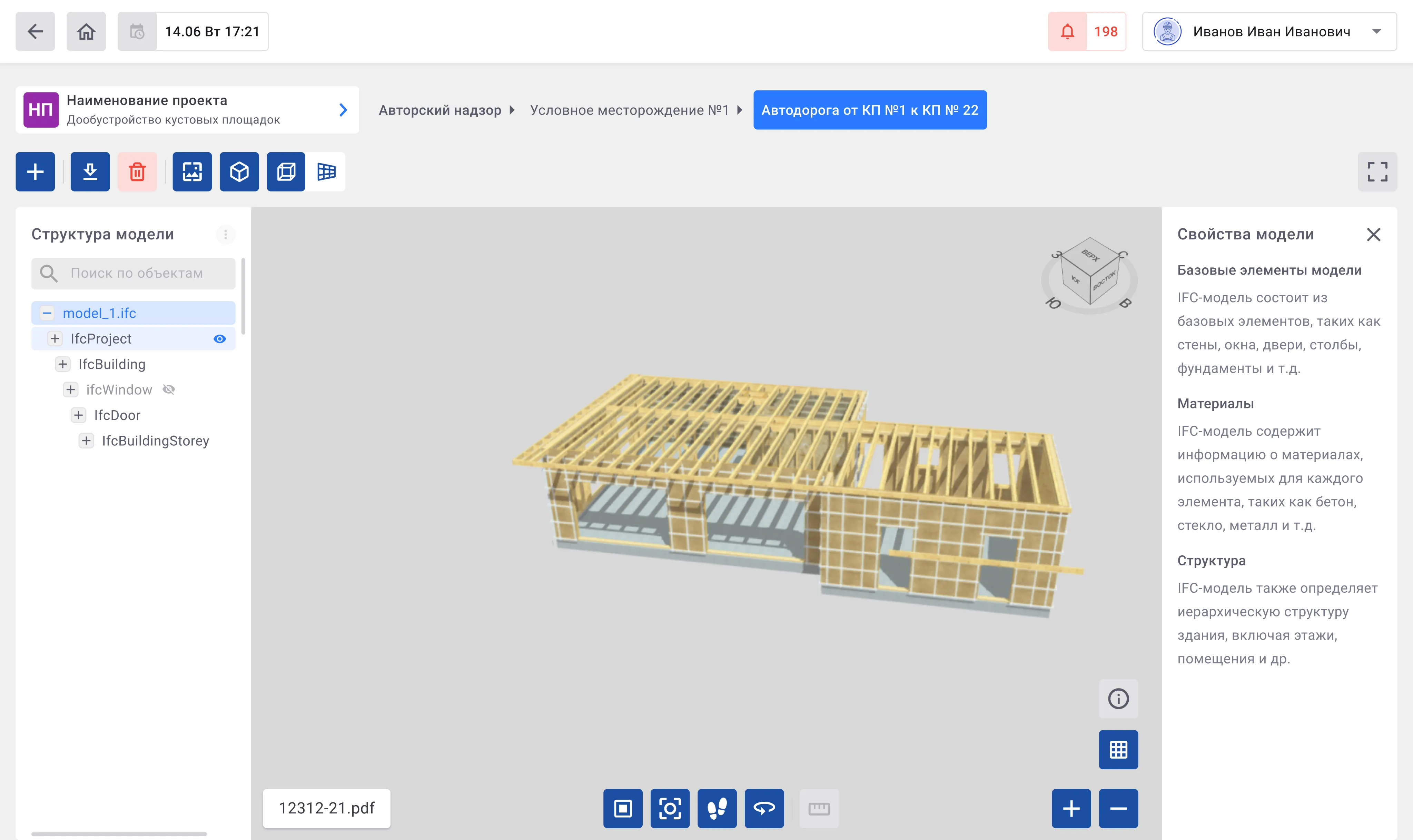
3D Viewer for IFC models
Designed a module that allows users to view and interact with IFC-format 3D models directly in the system. Users can explore the model structure, switch navigation modes, change display views, and access element properties without leaving the app.
 Goal
Goal The goal was to make BIM models accessible to all project participants, not just architects and engineers, but also managers and clients. The viewer needed to provide intuitive interaction with models: rotate, zoom, hide elements, and inspect details, enabling faster communication and decision-making.
 Result
 The 3D viewer allowed users to study models directly in the app, find required elements quickly, and check details without external software. This simplified team coordination, reduced time spent on discussions, and improved overall project workflow.
 Personal challenge
 The main challenge was balancing full functionality with simplicity. The viewer had to be powerful enough for engineers familiar with BIM tools while remaining intuitive for non-technical users.
Core functionality
- 1 Model viewing
Users can expand or collapse the model structure and hide or show individual elements directly from the structure panel.
- 2 Search
The search tool works within the model structure, similar to project-level search, making it easy to locate elements.
- 3 Model viewing tools
Navigation and display buttons are available at the top and center of the workspace. Additional controls in the bottom-right corner allow toggling the base plane, showing or hiding element properties, scaling the model, and switching to fullscreen mode.
- Top view

- First-person view

- Display modes

- Centering

- Background color

- Toggle base plane

- Model properties

- Fullscreen mode

- Projection selection


- Top view
- 4 Viewing model properties
A dedicated panel on the right displays properties for selected elements, giving users detailed information without leaving the workspace.
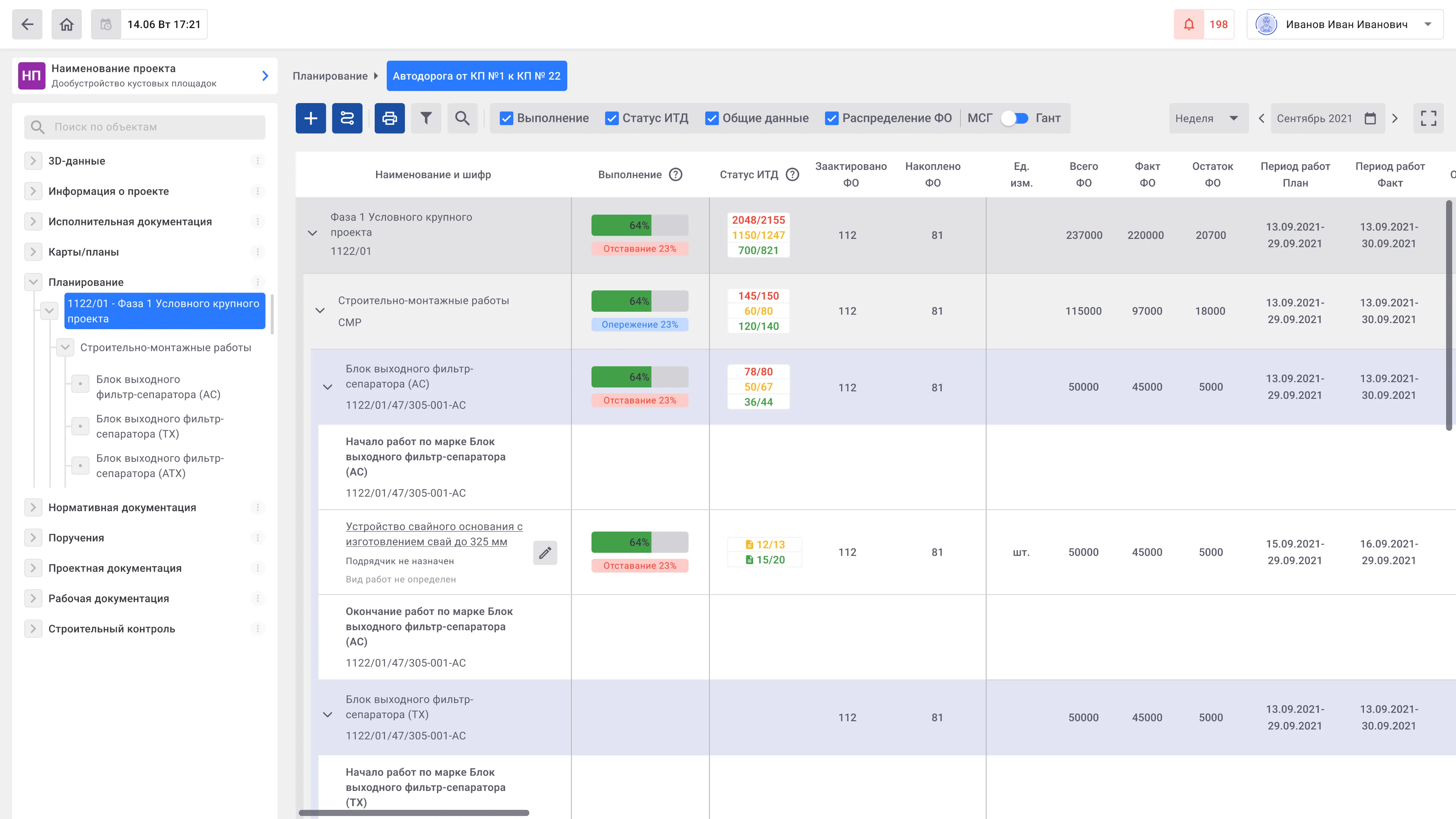
Monthly-Daily Schedule (MDS)
Designed an operational tool for planning and tracking construction and installation work, with day-by-day visibility. The schedule shows technological dependencies, task sequences, and links progress to time, resources, and costs while highlighting critical bottlenecks.
Goal The aim was to create a clear and automated planning interface that improves transparency and control over construction progress. Adjusting schedules and coordinating teams needed to be simple and intuitive. Visual clarity was a priority, making complex construction data understandable for both technical specialists and managers.
Result The final solution provides a functional interface for visualizing and managing schedules, enabling users to react quickly to changes and monitor progress in real time. Team communication improved, planning accuracy increased, and decision-making accelerated through clear visualization of statuses and risks. Users can seamlessly switch between overall views and detailed day-by-day or stage-specific information.
Personal challenge The main challenge was consolidating large, complex datasets into a concise and intuitive interface. Construction plans and timelines were visually structured to retain full information while simplifying interaction with large volumes of data. Navigation and quick search functions were designed so that both engineers and non-technical managers could use the interface effectively.
Core functionality
- 1 Schedule creation and display
Plan construction work by months and days, track task sequences, and monitor progress in detail.
- 2 Creating and editing timelines
Quickly create and adjust task schedules, assign performers, and manage shifts to reflect real-time site conditions.
- 3 Visualization of statuses and risks
Use color coding and visual indicators to display progress, resource load, deviations, and potential risks, giving an at-a-glance view of the project.
- 4 Navigation and detail
Switch easily between overall schedule views and detailed daily or stage-specific information to maintain full control over workflow.
- 5 Process automation
Support for automatic copying of stages, calculations, and recurring operations reduces time spent on manual updates and minimizes errors.
- 6 Data export and sharing
Export schedules and reports in multiple formats for analysis, reporting, and team collaboration.